
Linux tips and tricks
Why?
The terminal of UNIX based operating systems is insanely powerful, hence owning this power takes a lifetime. While learning it there are few tips and tricks that you can keep handy which will make you super productive. This document would be forever in Work in Progress mode and as I keep coming across any tips, I’ll be documenting them here.
tips
Sometimes we need super-user (
sudo) privilege to run a command, but we realize it only after executing it. Hence when we try to run the command again we either rewrite the entire command or use the up arrow key to get it again then edit it. But there is a simple way to do it. Usesudo !!to run the previously executed command withsudoprivilege.How to list the last three newly created files in a directory?
ls -ltr | tail -3How to send last three newly created files in a directory to a server?
scp `ls -ltr | tail -3` username@<ip>:<location>?variable stores the exit status code of last executed unix or linux shell command. If the value of?is 0 then it means that the last command executed successfully, but it it’s non-zero, that means there was some error.
Eg.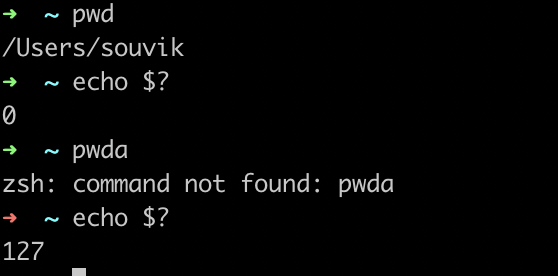
Compress a directory:
- fast-
tar -cv /path/to/dir | gzip --fast newFileName.tar.gz(fast compression) - best-
tar -cv /path/to/dir | gzip --best newFileName.tar.gz(best compression)
- fast-
pigzis a parallel implementation ofgzipis much faster when compressing multiple number of files:tar -cv source-dir/ | pigz --best > target-file-name.tar.gzYou can use
findandsedto replace a particular string with another string, accross all the files in a directory using the following command:for i in $(find pkg -type f -name "*_test.go"); do echo "Checking file $i:"; sed -i -e 's/common\//github.com\/ArecaBay\/service\/pkg\//g' $i ; echo ""; doneHere, I’m substituting all the occurances of the pattern “common/” with “github.com/ArecaBay/service/pkg/” in all files with suffix “_test.go” in the directory “pkg”.NOTE: When you run
sed, it creates backup files with the suffix “-e”, hence if you want to clean all those backup files you can runfind . -name "*-e*" -type f -deleteIt is useful to run some commands automatically when certain files change, like, I want to run
go installin my working directory every time I edit any go file. You can do it using this tool https://github.com/cespare/reflex using the following command:reflex -r '\.go' go installBonus tip:
nohupit using the following command to run in the background and ignore the input and append output to.outfile to avoid activity on screen.:nohup reflex -r '\.go' go install &You can of course control the background processes using
jobscommand afterwards.If you’re using vim you can run it async using
AsyncRunplugin using:AsyncRun reflex -r.gogo installThis will enable use you to look out for compilation errors in the quickfix window easily. (’:copen
to open and:cclose` to close)